
Businesses and advertising agencies often need a reliable way to manage Facebook Pages, advertising accounts, business assets, permissions, and campaigns. A Facebook Business Manager, now commonly associated with Meta Business Manager and Meta Business Portfolio, provides a centralized environment for managing these assets.
Some businesses search for Buy Verified Facebook Business Manager services because they want a verified business setup without going through the complete setup process themselves.
However, purchasing a verified Business Manager requires careful consideration. Buyers should understand what verification means, what access and documentation are included, how ownership is handled, and what risks may exist with a previously created account.
My Verified BM offers verified Facebook Business Manager options, including BM1, BM3, and BM5 packages, along with different spending-limit and setup options. The website states that its services include verification documentation, domain and email access, delivery options, and replacement support depending on the selected package.
What Is a Facebook Business Manager?
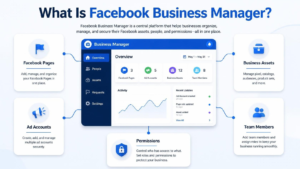
Facebook Business Manager is a business management system used to organize and manage Facebook and Meta advertising assets.
Businesses can use Business Manager to manage assets such as:
- Facebook Pages
- Ad accounts
- Business assets
- People and permissions
- Advertising activities
- Business-related resources
Instead of managing every business asset directly from a personal Facebook profile, businesses can organize their advertising operations through a dedicated business environment.
For agencies and businesses running multiple advertising campaigns, proper asset organization and permission management can make account administration easier.
What Does a Verified Facebook Business Manager Mean?
Business verification generally refers to confirming business information through Meta’s verification process.
Verification can involve information such as:
- Legal business information
- Business address
- Business documentation
- Contact information
- Domain information
- Email confirmation
A verified Business Manager should not automatically be interpreted as a guarantee that every advertisement will be approved or that an account can advertise without restrictions.
Advertising eligibility can still depend on Meta’s policies, account history, payment activity, advertising content, and other factors.
Why Do Businesses Want a Verified Business Manager?
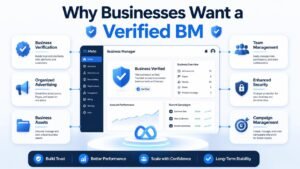
Businesses may look for a verified Business Manager for several practical reasons.
1. Organized Business Asset Management
A Business Manager can provide a centralized place to manage business assets, advertising accounts, Pages, and user permissions.
2. Business Verification
A verified setup can provide an established business identity and may be required for certain Meta business features or processes.
3. Advertising Operations
Businesses running regular advertising campaigns may prefer a dedicated business environment rather than relying entirely on personal account management.
4. Agency Management
Marketing agencies can use business management tools to organize client assets and manage access between different team members.
5. Higher Spending Requirements
Some advertisers specifically look for Business Manager options associated with higher spending limits. My Verified BM lists different BM packages, including BM1, BM3, and BM5 options with different advertised spending and history configurations.
Should You Buy a Verified Facebook Business Manager?
Before you buy a verified Facebook Business Manager, you should understand exactly what you are receiving.
A purchased Business Manager may have an existing history, business information, domain, email, permissions, and other configuration details. Therefore, buyers should confirm ownership and access arrangements before completing a purchase.
Important questions include:
- Who owns the Business Manager?
- What documentation is provided?
- Is the domain included?
- Is email access included?
- What administrator access will you receive?
- Can previous administrators retain access?
- What happens if the account becomes restricted?
- Is replacement support included?
- What are the terms of the package?
The safest approach is to understand the account structure and ownership terms rather than choosing a provider based only on price.
What Should You Check Before Buying a Verified BM?
Before purchasing, review the following areas.
Business Information
Confirm that the business information associated with the Business Manager is properly documented and that you understand what information is being transferred or provided.
Administrator Access
Make sure you receive the appropriate administrative access and understand whether any previous users or administrators remain connected.
Domain and Email Access
If domain or email access is advertised as part of the package, confirm exactly what access you will receive.
My Verified BM states that its verified BM packages can include access to the verified domain and email used during setup.
Replacement Policy
Check the replacement terms before purchasing.
My Verified BM states that replacement support depends on the selected package and that some packages include basic or lifetime replacement options.
Delivery Time
Delivery times can vary between packages. My Verified BM currently states that delivery can range from approximately 2 to 24 hours, while some parts of the site advertise faster delivery for particular packages.
Problems and Risks With Purchased Business Managers
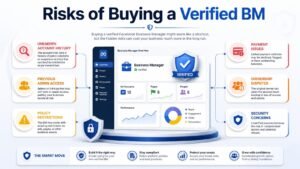
Buying a previously created or verified Business Manager can involve risks if ownership and account history are unclear.
1. Unknown Account History
You may not know the complete history of a Business Manager unless the provider clearly explains it.
2. Previous Administrator Access
If previous administrators or users remain connected, they could create security or ownership concerns.
3. Policy Restrictions
A verified status does not guarantee that an account will remain unrestricted. Meta’s policies and enforcement can affect business and advertising accounts.
4. Payment Issues
Advertising accounts can have payment-related restrictions. Buyers should understand how payment methods and billing arrangements are handled.
5. Ownership Disputes
If business information or account ownership is unclear, disputes can become difficult to resolve.
6. Security Concerns
Sharing credentials or leaving unknown users connected to a Business Manager can create unnecessary security risks.
How to Create Your Own Facebook Business Manager
Businesses that do not want to purchase a pre-existing setup can create and verify their own Business Manager.
A general process includes:
- Create a Meta business environment.
- Add accurate business information.
- Add the required Facebook Pages and advertising assets.
- Add team members with appropriate permissions.
- Configure security settings.
- Add and verify the business information when required.
- Complete Meta’s verification process using genuine business information and documentation.
Creating your own Business Manager gives you greater control over the original business information and account setup.
How Does Business Verification Work?
The verification process can require businesses to provide accurate information and supporting documentation.
Typical information may include:
- Legal business name
- Business address
- Contact information
- Business registration details
- Domain information
- Supporting documents
Businesses should always use genuine and consistent information.
Providing false or misleading business information can create account and verification problems.
How to Avoid Fake or Unreliable Verified BM Services
If you are searching for Buy Verified Facebook Business Manager, do not select a provider based only on a low price.
Check the following:
Verify What Is Included
Ask whether the package includes:
- Business Manager access
- Domain access
- Email access
- Documentation
- Administrator access
- Replacement support
Check Ownership Terms
Understand who controls the Business Manager before and after delivery.
Ask About Account History
If the package has spending history or an aged setup, ask what that means and what information is included.
Avoid Guaranteed Results
No Business Manager should be treated as a guarantee of unlimited advertising success, permanent approval, or immunity from Meta’s policies.
Buy Verified Facebook Business Manager From My Verified BM
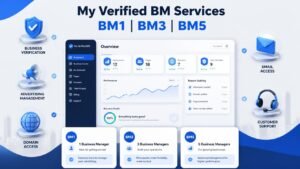
My Verified BM currently offers several verified Business Manager options designed for advertisers and businesses with different requirements.
The website lists options including:
- Verified BM1
- Verified BM3
- Verified BM5
- Verified BM options with spending history
- Verified BM options without spending history
- Document-verified BM options
- WhatsApp API accounts
- WhatsApp automation services
The website also states that its verified BM packages can include documentation, domain and email access, delivery support, and replacement terms depending on the selected package.
When choosing a package, consider your advertising requirements, budget, account history needs, access requirements, and the specific terms provided for that package.
How to Buy a Verified BM From My Verified BM
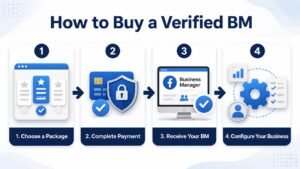
The website currently describes a simple purchase process:
Step 1: Choose a Package
Select the verified BM package that matches your advertising requirements and budget.
Step 2: Complete Payment
Follow the available payment and ordering process.
Step 3: Receive Your BM
The delivery timeframe depends on the selected package.
Step 4: Configure Your Business
After receiving access, review administrators, permissions, business assets, domain access, and security settings before starting advertising activities.
Best Practices After Receiving a Business Manager
After purchasing or receiving access to a Business Manager, review the account before using it for important campaigns.
Review Administrators
Check every user who has access and remove unauthorized users.
Update Security Settings
Use strong passwords and appropriate security measures for all associated accounts.
Review Business Assets
Check connected Pages, ad accounts, domains, payment methods, and other assets.
Check Account Notifications
Review any existing warnings, restrictions, or notifications before launching campaigns.
Follow Meta Advertising Policies
A verified Business Manager still needs to comply with applicable Meta policies.
Common Mistakes to Avoid
Avoid these common mistakes when purchasing or managing a verified BM:
- Buying only because the price is low
- Ignoring account ownership
- Failing to check administrator access
- Using inaccurate business information
- Ignoring existing restrictions
- Sharing login credentials unnecessarily
- Assuming verification guarantees ad approval
- Failing to understand replacement terms
- Not reviewing connected business assets
What to Ask a Verified BM Provider Before Buying
Before placing an order, ask the provider:
- Is the Business Manager verified?
- What documentation is included?
- Will I receive administrator access?
- Is domain access included?
- Is email access included?
- Does the BM have spending history?
- What spending limit is associated with the package?
- What happens if the BM becomes restricted?
- Is replacement support available?
- How long does delivery take?
- Are there any existing users or administrators?
- What are the ownership and transfer terms?
Getting clear answers before purchasing can help you understand exactly what you are paying for.
Conclusion
A Verified Facebook Business Manager can be useful for businesses, agencies, and advertisers that need an organized environment for managing Meta business and advertising assets.
However, buying a verified BM should not be treated as a shortcut around Meta’s policies or advertising requirements. Buyers should carefully review ownership, administrator access, documentation, account history, security, spending-limit details, and replacement terms.
My Verified BM offers different verified BM packages, including BM1, BM3, and BM5 options, along with other Meta and WhatsApp-related services. Before purchasing, review the specific package details and confirm what is included.
If you are looking to Buy Verified Facebook Business Manager, choose a package based on your actual business and advertising requirements and make sure you understand the access and support terms before completing your order.
Frequently Asked Questions
Can I Buy a Verified Facebook Business Manager?
Yes, services offering verified Facebook Business Manager packages are available. My Verified BM currently lists several verified BM options, including BM1, BM3, and BM5 packages.
Is a Purchased Business Manager Safe?
Safety depends on ownership, account history, administrator access, security, and how the account is used. Buyers should review these factors carefully before purchasing.
Does a Verified BM Guarantee Ad Approval?
No. Verification should not be considered a guarantee that every advertisement will be approved. Advertising activity remains subject to Meta’s policies and account conditions.
What Is BM1, BM3, or BM5?
These are different Business Manager package types offered by providers. Their specific configuration, spending history, spending limits, and other features can vary by package.
Can I Connect My Ad Account to a Verified BM?
My Verified BM states that customers can link personal or business ad accounts with its verified BM services. However, the exact setup should be confirmed for the package you purchase.
Does My Verified BM Offer Replacement?
The website states that replacement support is available, with the specific replacement terms depending on the selected package.
How Long Does Delivery Take?
Delivery varies by package. My Verified BM currently states that delivery typically ranges from 2 to 24 hours, while some individual packages advertise faster delivery.